Qetreo: A Modern Display Font for High-Tech Designs
In the crowded landscape of digital typography, finding a typeface that instantly communicates innovation without sacrificing readability is a challenge. Qetreo has emerged as a compelling solution for designers and creators seeking a sleek, modern aesthetic with a distinct techy feel. Its clean lines and futuristic look make it perfect for high-tech designs, digital displays, and branding projects that need to project forward-thinking values. However, like any specialized display font, Qetreo requires a thoughtful approach to ensure it elevates your project rather than overwhelming it.
Understanding the Character of Qetreo
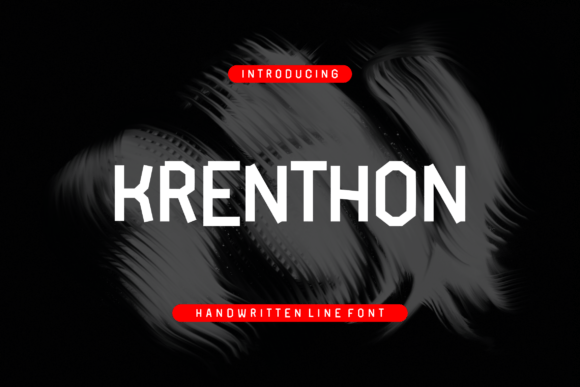
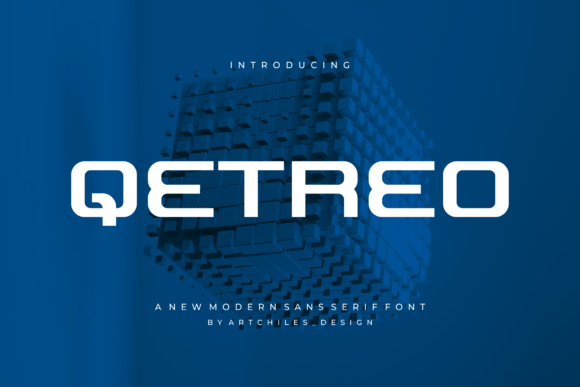
At its core, Qetreo is designed to be a statement piece. It is not a workhorse serif or a utilitarian sans-serif meant for long-form body text. Instead, it belongs to the category of display fonts, engineered to grab attention at larger sizes. The geometric precision and sharp angles inherent in its design evoke the precision of circuitry and the sleekness of modern interfaces. This makes it an ideal choice for technology startups, software landing pages, gaming assets, and digital signage where visual impact is paramount.
The appeal of Qetreo lies in its ability to bridge the gap between cold, industrial functionality and warm, human-centric design. When used correctly, it signals to the audience that a brand is current, efficient, and digitally native. Yet, this specific strength can become a weakness if the font is applied without understanding its limitations. Many users fall into the trap of assuming that because a font looks "techy," it is suitable for every element of a tech-related project.
Common Pitfalls When Using Futuristic Typefaces
One of the most frequent mistakes I see professionals and beginners alike make is using Qetreo for extended paragraphs of text. While the font's clean lines are visually striking, they can cause eye strain when read in small sizes or dense blocks. The unique character shapes, which define its futuristic personality, often reduce legibility at standard reading sizes. If you attempt to use Qetreo for a blog post, a terms of service agreement, or even a lengthy product description, you risk alienating your readers who will struggle to process the information quickly.
Another overlooked detail involves pairing. Because Qetreo has such a strong, dominant voice, it clashes easily with other decorative or highly stylized fonts. A common error is attempting to pair it with another display font that has similar geometric traits. This creates visual noise and competition on the page, leaving the viewer unsure of where to focus. The result is a design that feels chaotic rather than cohesive, undermining the professional image you are trying to build.
Furthermore, there is a tendency to overlook the importance of weight and spacing. In digital environments, especially on mobile devices, tight tracking (letter-spacing) can cause characters to blur together. With a font like Qetreo, which relies on precise negative space to maintain its crisp appearance, squeezing the letters too close together destroys the very structure that makes it look modern. Conversely, spreading them out too much can break the word recognition flow, making the text look disjointed.
How These Mistakes Impact Your Results
The consequences of misusing a display font extend beyond simple aesthetics; they directly affect usability and communication efficiency. If your audience cannot read your content effortlessly, they will leave your site or ignore your message. In the context of a high-tech product launch, poor typography can inadvertently signal a lack of attention to detail. Users might subconsciously associate the difficulty in reading your headlines with a difficult user experience in your actual software or product.
From a cost perspective, these errors lead to wasted time and resources. Redesigning a campaign or reworking a website layout because the chosen font failed to perform is expensive. For freelancers and small business owners, the reputation damage of presenting a poorly executed design can be harder to quantify but equally costly. A design that fails to communicate clearly misses the opportunity to convert visitors into customers, regardless of how "cool" the font initially looked.
Better Approaches for Applying Qetreo
To avoid these pitfalls, start by defining the role of Qetreo in your hierarchy. Treat it strictly as a headline or subheadline font. Use it for logos, hero sections, call-to-action buttons, and section titles where brevity and impact are key. For all body copy, pair Qetreo with a highly legible, neutral sans-serif or a clean slab serif. This combination allows Qetreo to provide the futuristic flair while the secondary font handles the heavy lifting of information delivery.
When selecting weights, prioritize clarity over density. Even if Qetreo offers multiple weights, stick to those that retain their structural integrity at the intended size. Test your design on various screens before finalizing. What looks crisp on a large desktop monitor may appear muddy on a smartphone. Adjust your leading (line-height) and tracking to ensure the characters breathe. Slightly increasing the letter-spacing often enhances the modern feel of Qetreo while improving readability on digital displays.
Evaluating Qetreo Before You Commit
Before downloading or purchasing Qetreo, it is essential to evaluate its compatibility with your specific project needs. Check the licensing terms carefully. Some display fonts have restrictions on commercial use, web embedding, or the number of users allowed. Ensure the license covers your intended scope, whether it is a single client logo, a full website deployment, or a marketing campaign across multiple platforms.
Also, consider the technical requirements. Does the font file format support the platforms you are using? For web projects, ensure that optimized web font formats (like WOFF2) are available to guarantee fast loading times. Slow-loading fonts can negatively impact your site's performance metrics and search engine rankings. Finally, review the character set. If your project requires special characters, diacritics, or symbols, verify that Qetreo includes them. A missing character can force you to switch fonts mid-project, creating an inconsistent visual identity.
Practical Steps for Success
- Limit Usage: Restrict Qetreo to headlines, logos, and short phrases to maintain impact and readability.
- Pair Strategically: Combine with a neutral, readable font for body text to create a balanced hierarchy.
- Test Responsiveness: Preview your design on mobile, tablet, and desktop to ensure the font scales well.
- Adjust Spacing: Experiment with tracking and leading to optimize legibility without losing the futuristic style.
- Verify Licensing: Confirm that the usage rights match your project's scope and distribution channels.
By approaching Qetreo with intention and awareness, you can harness its sleek, modern energy to create designs that truly resonate. It is a powerful tool for communicating innovation, but like any tool, its value depends entirely on how skillfully it is wielded. Avoid the temptation to overuse it, respect its limitations, and let it shine where it matters most—in those moments where you need to make a bold, futuristic statement.