Memosa: A Bold Display Font for High-Impact Visual Workflows
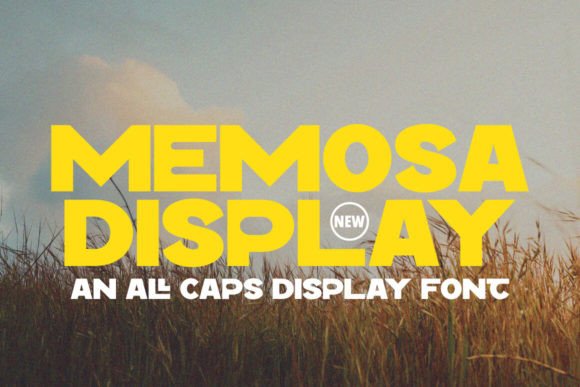
In the crowded landscape of digital communication, the first point of contact between a brand and its audience is often visual. Before a single sentence is read, the typography sets the tone, establishes authority, and dictates the hierarchy of information. Memosa enters this space as a bold, eye-catching display font characterized by big, all-caps letters and strong, clean lines. It is not merely a decorative element; it is a functional tool designed for headlines and titles that must stand out in a split second. For professionals ranging from graphic designers to marketing strategists, understanding how to integrate Memosa into a broader creative workflow is essential for achieving clarity and impact.
The Role of Display Typography in Visual Strategy
Typography serves two primary functions: legibility and expression. While body text requires high readability for extended reading sessions, display fonts like Memosa are engineered for immediate recognition. The decision to use a specific typeface should never be an afterthought. Instead, it must be part of the initial planning phase of any project. When a designer or content creator selects Memosa, they are making a strategic choice to prioritize presence and confidence over subtlety.
The defining characteristics of Memosa—its monumental scale and uniform capitalization—make it ideal for environments where attention is scarce. In a social media feed, a website landing page, or a printed poster, the human eye scans quickly. Memosa acts as a visual anchor, stopping the scroll and directing focus to the most critical message. This utility places it squarely within the "attention" stage of the user journey. By utilizing such a strong visual asset early in the process, creators can ensure that their core value proposition is communicated before the audience disengages.
Integrating Memosa into the Pre-Production Phase
Effective implementation begins long before the font file is opened in design software. During the pre-production or planning stage of a project, teams must define the visual language that aligns with their goals. If the objective is to convey strength, modernity, or urgency, Memosa becomes a viable candidate. However, because of its aggressive nature, it requires careful consideration of context.
Before committing to Memosa, stakeholders should evaluate the surrounding assets. A bold, all-caps font demands negative space to breathe. If the layout is already cluttered with imagery, icons, and dense text, adding Memosa could result in visual noise rather than clarity. Therefore, the preparation phase involves auditing the available canvas. Designers should ask whether the headline needs to shout or whisper. If the answer is shout, Memosa fits the brief. This decision-making process ensures that the font supports the narrative rather than overpowering it.
Furthermore, compatibility with other brand elements is crucial at this stage. Memosa pairs best with sans-serif body fonts that offer high contrast in weight but harmony in geometry. Mixing Memosa with overly ornate serif fonts or script styles can create a disjointed aesthetic that confuses the viewer. Planning these pairings early prevents costly revisions later in the production cycle. By establishing a clear typographic hierarchy during the mood board or wireframe phase, teams can streamline the execution process and maintain consistency across all deliverables.
Execution: Applying Memosa in Design and Content Creation
Once the strategy is set, the execution phase focuses on the practical application of the font. The strength of Memosa lies in its clean lines, which render well across various mediums, from high-resolution print to mobile screens. However, the way it is implemented significantly affects the final outcome.
Sizing and Scale
Because Memosa is designed for headlines, it should rarely be used for small text. Attempting to shrink the font for subheadings or captions defeats its purpose and compromises legibility. In a workflow, this means assigning Memosa strictly to H1 tags, main banners, or cover art. The size should be proportional to the importance of the message. A common mistake is using the font at a size that feels large but lacks the necessary visual weight due to poor scaling. Designers should test the font at actual output sizes to ensure the bold strokes remain distinct and do not blur or merge on different devices.
Kerning and Spacing
The all-caps nature of Memosa makes letter spacing (tracking) a critical variable. Tight kerning can make the word look solid and block-like, suitable for modern, industrial aesthetics. Conversely, increased tracking can lend an air of elegance and sophistication, allowing each letter to stand alone. During the design process, experimenting with these settings is vital. There is no one-size-fits-all setting; the optimal spacing depends on the length of the headline and the background texture. Short words may benefit from tighter spacing, while longer phrases might require more room to prevent the line from looking like a dense wall of text.
Color and Contrast
The clean lines of Memosa respond well to high-contrast color schemes. To maximize visibility, the font should be placed against backgrounds that provide sufficient separation. White text on a dark background or vice versa often yields the best results for this style. In complex workflows involving multiple platforms, maintaining consistent color usage ensures brand recognition. Whether the output is a YouTube thumbnail, an Instagram story, or a business card, the interaction between the Memosa text and the background must be tested for accessibility and impact.
Workflow Integration Across Platforms and Teams
For freelancers and agencies managing multiple clients, integrating Memosa into a standardized workflow enhances efficiency. Once the font is approved for a brand, it should be saved in a centralized asset library accessible to all team members. This prevents version control issues and ensures that every piece of content maintains the same visual identity.
In collaborative environments, clear guidelines regarding the use of Memosa are necessary. Not every team member may understand the limitations of a display font. Creating a simple style guide that outlines when and how to use Memosa can prevent misuse. For instance, specifying that Memosa is reserved for primary headlines only helps copywriters and junior designers avoid applying it to body copy. This organizational step reduces the time spent on quality control and editing, allowing the team to focus on higher-level creative decisions.
Moreover, Memosa interacts seamlessly with modern design tools like Adobe Creative Cloud, Figma, and Canva. Its vector-based structure allows for easy manipulation without loss of quality. In web development workflows, the font can be embedded via CSS using standard formats like WOFF2, ensuring fast load times and crisp rendering across browsers. Developers should work closely with designers to ensure that the font loading strategy does not delay the appearance of the headline, preserving the intended "bold" impact for the end-user.
Quality Control and Long-Term Usability
As projects evolve, maintaining the integrity of the typography is key to long-term success. Regular audits of marketing materials and digital assets help identify inconsistencies. Over time, trends shift, and a font that once felt cutting-edge might become dated. However, Memosa's clean, geometric foundation gives it a timeless quality that resists rapid obsolescence. Its reliance on fundamental shapes rather than fleeting stylistic flourishes ensures it remains effective for years.
Quality control also involves monitoring performance metrics. In digital campaigns, A/B testing headlines written in Memosa against other typefaces can provide data-driven insights into what resonates with the target audience. Does the boldness convert better? Does it increase click-through rates? These observations feed back into the planning process, refining future decisions about typography. By treating Memosa as a dynamic asset rather than a static decoration, businesses can optimize their visual communication strategies continuously.
Practical Implementation Tips for Creators
To get the most out of Memosa, consider these practical steps for your next project:
- Limit Usage: Reserve Memosa for the top level of your hierarchy. Use it for one main statement per page or slide to avoid visual fatigue.
- Test Readability: Always preview the font on mobile devices. Large letters can sometimes break layout grids on smaller screens if not responsive.
- Pair Strategically: Combine Memosa with a neutral, highly readable sans-serif for body text to create a balanced composition.
- Check Licensing: Ensure you have the appropriate license for commercial use, especially if the project involves branding or merchandise.
- Experiment with Weight: If the font family offers variations, test them to see which weight best suits the medium, though the standard bold usually performs best.
Ultimately, Memosa is more than just a collection of letters; it is a strategic asset for those who understand the power of visual hierarchy. By incorporating it thoughtfully into the planning, execution, and review stages of a project, professionals can create communications that are not only seen but remembered. Its bold character demands respect, but when wielded with precision, it delivers exceptional results for brands and creators aiming to make a lasting impression.