Neon Halloween: Crafting Unforgettable Spooky Displays
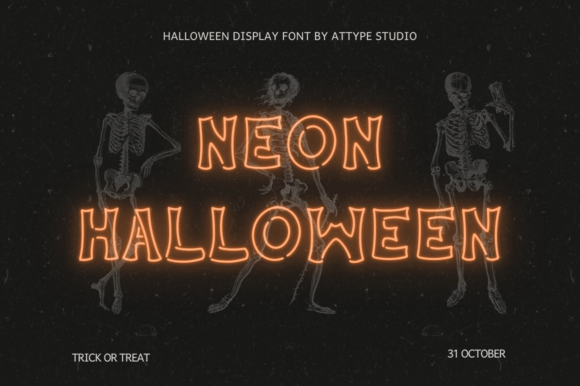
Halloween is a season defined by atmosphere, and nothing sets a mood quite like the glow of neon. For years, creating that specific electric ambiance required expensive glass tubing, hazardous gases, and professional installation. Today, digital design has democratized this aesthetic, allowing creators to simulate that vibrant, flickering light with incredible precision. At the forefront of this trend is Neon Halloween, a custom font designed specifically to bring spooky visions to life. Its unique broken outline style mimics the imperfect, handcrafted look of real neon tubes, making it an essential tool for anyone looking to craft eye-catching signs that leave a lasting impression.
Whether you are a small business owner trying to boost foot traffic during October, a marketer designing social media assets, or a homeowner planning a neighborhood showstopper, the right typography can make or break your display. However, simply downloading a font file does not guarantee a stunning result. Many users approach neon-style design with misconceptions about how these fonts function, leading to flat, unconvincing graphics or technical headaches. Understanding the nuances of Neon Halloween and avoiding common pitfalls will ensure your projects shine as brightly as intended.
Understanding the Broken Outline Aesthetic
The primary appeal of Neon Halloween lies in its distinctive broken outline style. Unlike standard typefaces that offer solid, continuous strokes, this font intentionally introduces gaps and irregularities. This design choice is not a flaw; it is a deliberate artistic decision to replicate the way real neon glass bends, connects, and occasionally flickers. When used correctly, this texture adds depth and realism, transforming a simple text layer into a believable light source.
People are drawn to this style because it evokes nostalgia while maintaining a modern edge. It bridges the gap between retro diner signage and contemporary horror aesthetics. For entrepreneurs and bloggers, using Neon Halloween signals creativity and attention to detail. It suggests that the creator understands the visual language of their audience, who often associates glowing, jagged lines with excitement and the supernatural. However, the very feature that makes the font unique also presents challenges if the user does not understand how to manipulate it within their design software.
Common Mistakes That Dim Your Display
Despite the font's intuitive appeal, several common errors can undermine the quality of your final project. One of the most frequent mistakes is treating Neon Halloween like a standard sans-serif font. Users often apply it at small sizes or in dense blocks of text, which causes the broken outlines to merge into an unreadable mess. The gaps in the letters are designed to be seen from a distance, simulating the perspective of a viewer looking at a sign on a building. When shrunk down for body copy or mobile notifications, the "broken" effect becomes noise rather than art.
Another overlooked detail involves color selection. Real neon relies heavily on the contrast between the bright gas inside the tube and the dark background. A common error is placing neon text on a light or busy background. Without deep shadows and a dark environment, the illusion of light fails. If you use Neon Halloween on a white page without adding a glow effect, the result looks like a hollow stencil rather than a glowing sign. This mistake significantly reduces the impact of your message, making it appear cheap or unfinished.
Furthermore, many beginners neglect the importance of kerning and spacing. Because the font features irregular edges, tight letter spacing can cause characters to visually collide, breaking the flow of the word. This is particularly problematic when creating logos or headlines where clarity is paramount. Poor spacing can make a brand name difficult to read instantly, which is fatal for marketing materials where split-second recognition is key.
How These Errors Impact Your Results
The consequences of these oversights extend beyond mere aesthetics. In a professional context, a poorly executed neon sign can damage brand perception. If a bakery uses a glitchy, unreadable neon font for their Halloween promotion, customers may subconsciously associate the confusion with the quality of their service. For freelancers and designers, delivering a project that lacks the expected "glow" can lead to dissatisfaction and lost future work. The effort invested in choosing a premium or specialized font is wasted if the execution renders it ineffective.
In terms of efficiency, correcting these issues after a project is printed or published is costly. Reprinting flyers, re-rendering video ads, or redesigning web banners takes time and money that could have been saved with proper planning. Moreover, the emotional impact of Halloween is fleeting. If your display fails to capture attention immediately due to poor design choices, you miss the opportunity to engage your audience during the critical peak of the season.
Practical Strategies for Better Design
Avoiding these pitfalls requires a shift in how you approach the design process. Start by reserving Neon Halloween for headlines, logos, and short phrases. It is a display font, not a body font. Use it sparingly to draw the eye to key information. When setting the size, ensure it is large enough for the gaps in the letters to remain distinct. If you are designing for print, test the output at full scale before committing to a run. On screens, check how the font renders on different devices to ensure the details do not get lost on lower-resolution displays.
To achieve the authentic look, you must embrace the power of layer effects. Do not rely solely on the font's shape. Add an outer glow in your design software, matching the color of the text but with a slightly softer opacity. This simulates the diffusion of light against a surface. Pair this with a drop shadow to ground the text in space. Remember that real neon casts light onto nearby surfaces; replicating this subtle interaction adds a layer of realism that flat colors cannot achieve.
Color theory is also vital. Stick to high-contrast palettes. Classic neon colors like hot pink, electric blue, lime green, and amber pop best against black, charcoal, or deep purple backgrounds. If you must use a lighter background, consider inverting the effect by making the text dark and adding a glow around it, though this is less common for Halloween themes. Always preview your design in a dimly lit environment if possible, as this mimics the actual viewing conditions of a neon sign.
Evaluating Your Options Before You Commit
Before purchasing or downloading Neon Halloween, take the time to evaluate its compatibility with your specific needs. Check the license agreement carefully. Some free versions of custom fonts restrict commercial use, which can be a legal trap for small business owners and marketers. Ensure the license covers your intended application, whether it is for social media graphics, merchandise, or physical signage.
Also, inspect the character set. Does the font include all the necessary ligatures, numbers, and special characters you might need? A limited character set can force you to switch fonts mid-sentence, ruining the visual consistency of your design. Look for reviews or previews that show the font in various contexts to gauge its versatility. While Neon Halloween is excellent for spooky themes, it may not suit every type of branding. Be honest about whether the style aligns with your overall message.
Finally, consider the technical requirements. Does your design software support the file format? Are there any known rendering issues with the specific version you are considering? Taking these steps ensures that the font serves as a powerful asset rather than a source of frustration. By approaching Neon Halloween with knowledge and intention, you can create displays that truly captivate, ensuring your Halloween vision stands out in a crowded seasonal landscape.